
IELTS is a tool I built for practising IELTS speaking and writing, and it recently gained a mock-interview mode. The code is on GitHub; the newest branch is desktop-realtime-voice. This post takes the current code as the baseline and walks through three questions: who does the work and when, what the data looks like and where it lives, and why it is split this way. Section 5 lists the current problems; how they came about is in the retrospective.
1. The overall picture
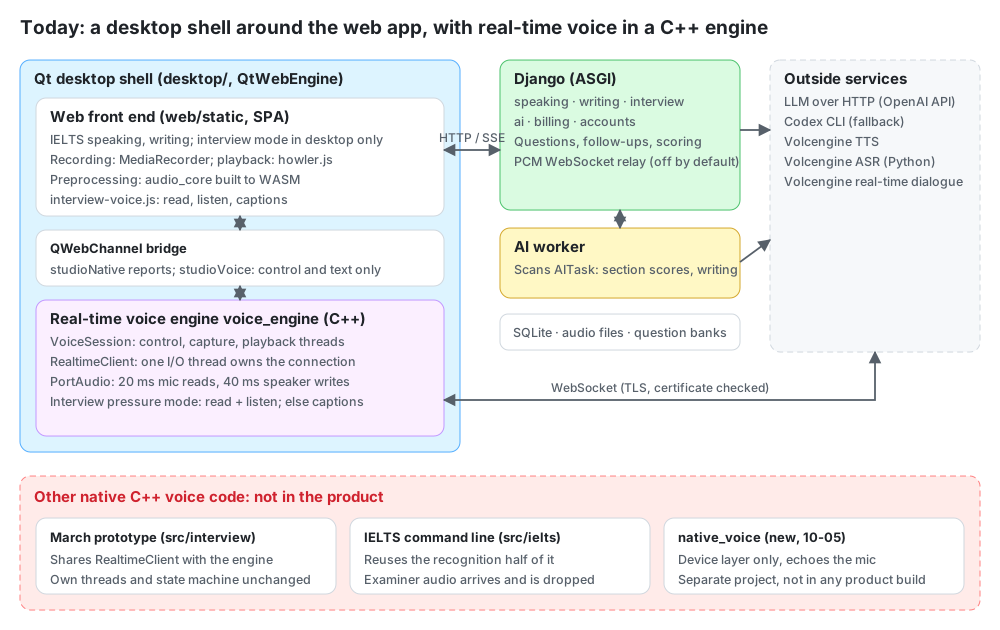
IELTS today has three parts:
- A Qt shell around the web app:
desktop/is a QtWebEngine program whose window loads theweb/staticfront end. The same pages work directly in a browser. - A Django backend with an AI worker: speaking, writing, interviews, AI calls and billing.
- A C++ real-time voice engine: the static library
voice_engine(VoiceSession,RealtimeClient, PortAudio), wired into the desktop shell on 31 October. The March real-time prototype, the IELTS command-line version andnative_voice, written in October, are still not in the product.audio_coreis built to WASM for recording preprocessing in the web page.
So voice takes different paths in the browser and the desktop app:
- In a browser: the page records and uploads, and the backend calls Volcengine.
- In the desktop app’s interview pressure mode: the C++ engine talks to Volcengine’s real-time dialogue service directly, reading the question, listening and producing the transcript.
- On the desktop app’s other practice pages: recording works as before, and the engine produces live captions that become the turn’s transcript.
2. Who does the work, and when
2.1 The desktop shell
- Loads the backend’s web pages in QtWebEngine; the backend address is a setting, defaulting to the local
127.0.0.1:8767. - Keeps a single window and redirects
window.openinto it, shows a local error page when the backend is unreachable, keeps the login across restarts, and has Chinese menus. - The page and Qt share two QWebChannel objects:
studioNative.capabilities()reports capabilities: desktop or not, whether interview mode is available, andnative_audio.native_audioistrueonly when all three hold: the engine can initialise (PortAudio has input and output devices), the local config has Volcengine credentials, and microphone permission is granted.studioVoicecontrols real-time voice; see 2.5.
- The Volcengine credentials live in the local file
~/.ielts-studio/realtime_voice.json, outside the repository and never through the page. - QtWebEngine exposes browser dictation (the Web Speech API) but ships no speech service, and calling it gets the renderer killed, so the shell hides it with a script at start-up.
2.2 One IELTS turn: the user is waiting, so it runs in the request
- The page plays the examiner’s voice (howler.js). The first question is a fixed recording; later ones are synthesised by the backend with Volcengine TTS.
- The user answers and the page records with MediaRecorder. The transcript comes from one of two places:
- in an ordinary browser, browser dictation produces one alongside;
- in the desktop app dictation is hidden, so the real-time engine captions the recording instead, and at submit those captions are the turn’s transcript (source
desktop_realtime_captions).
- When the user stops, the page uploads the recording and completes the turn. Where there is no transcript, the backend fills one in from the whole recording with Volcengine ASR.
- The page opens an SSE connection for the follow-up. Django reads the question and transcript, builds the prompt, asks the LLM for a streamed answer and pushes it to the page as it arrives.
- As soon as there is a complete question the backend synthesises the voice on a thread and pushes
tts_ready; the page plays it.
2.3 Section scoring: slow, can fail, billed, so it goes to the worker
The page asks for a score and Django writes a row into the AITask table with status pending. The worker scans the table every 1 to 2.5 seconds, claims the task, calls the model, writes the report back and charges for actual usage. The page polls the task every 2.5 seconds and stops at a final state. Tasks running over 900 seconds are taken back by the worker, re-queued or marked failed.
2.4 Interview mode: desktop only, and pressure mode is real-time voice
The backend’s apps/interview handles interviews: a built-in question bank, or questions generated by the LLM from a CV and job description; then a session, one question at a time, and a report at the end. There are two modes:
- Standard mode: no follow-ups. Each answer goes straight to the next planned question, with no LLM decision. Answers are recorded and uploaded; in the desktop app the engine captions them and the captions become the transcript.
- Pressure mode: every answer waits for the interviewer (the LLM) to decide between a follow-up and the next question. There is no rubric and no quota on follow-ups, only a safety stop. In the desktop app this mode is real-time voice: the engine reads the question and listens, and the final transcript is submitted on its own through the existing typed-answer endpoint (source
desktop_realtime_asr, no audio upload). On an error, a disconnect or a timeout, that turn falls back to recording, and the next turn tries real-time voice again.
Interview AI calls are recorded in AITask too, but the task is claimed and run on the spot when it is created, without the worker. The interview “AI assistant” calls the local Codex CLI.
2.5 The real-time voice engine in the desktop shell
voice_engine is a C++ static library (cmake/voice_engine.cmake) that depends on neither Qt nor Django and holds no question content. Its core, VoiceSession, does two things: read out a given text, and listen to one utterance and produce its transcript. What to say and what to do with the transcript are up to the page and Django, so interviews and IELTS share one engine.
One session runs five threads:
| Thread | Does |
|---|---|
| Qt UI thread | VoiceBridge takes the page’s calls and passes them to the engine; engine events are queued onto this thread before they go to the page as signals |
| Control thread | Handles commands and server messages in order; the state machine changes only here, and outside callbacks are called only here, with no lock held |
| Capture thread | Reads a 20 ms packet (320 frames, 640 bytes) from PortAudio each time and uploads only while listening |
| Playback thread | Writes 40 ms chunks from a bounded queue to the speaker; past 60 seconds of backlog the oldest chunk is dropped |
| I/O thread | RealtimeClient’s owner of the connection (see 5.4); its callback only puts messages into the control thread’s queue |
Stop() joins every thread, none is detached, and Stop() takes at most 4 seconds in all.
One question in pressure mode:
Reading the question: the page gets the question from Django and calls
speak. The engine has the server read that exact text through the dedicated given-text interfaces:- if an “ASR ended” event (ASR_ENDED, meaning the user said something) has arrived since the last reading, it uses ChatTTSText (500), which may only be sent after one;
- otherwise it uses SayHello (300).
The playback thread plays only the audio for that text; the model’s own replies are logged, never played.
Listening: when the reading ends, the page calls
startListeningand the capture thread starts uploading. While the AI talks the microphone is not uploaded (input_mod = keep_alivein StartSession), so it is still half duplex.Transcribing: the server’s interim and final results go across the bridge and appear on the page as they arrive. When the user pauses longer than the end-of-speech window (
end_smooth_window_ms, 2000 ms in the default config), the server decides the user has finished. The page shows the final transcript for 0.6 seconds and submits it.The next line: Django decides between a follow-up and the next question, and it is back to step 1.
The other practice pages use only the listening half: recording works as before, the engine captions it, starts listening again after each pause the server detects, and at submit the accumulated captions are the turn’s transcript.
The engine writes its timings as JSON lines, and “the user stopped” is worked out from microphone loudness:
- the first second after the microphone opens sets the noise floor;
- a packet 20 dB above the floor counts as voiced;
- only 3 voiced packets in a row (60 ms) count as speech, so key clicks and speaker pops do not.
tools/voice_probe drives a session against the real service without the UI. It can mix a prepared answer digitally into the real microphone signal, so nothing plays in the room and the moment the answer ends is known, which serves as ground truth for the timings.
2.6 The March real-time prototype: complete, but not in the product
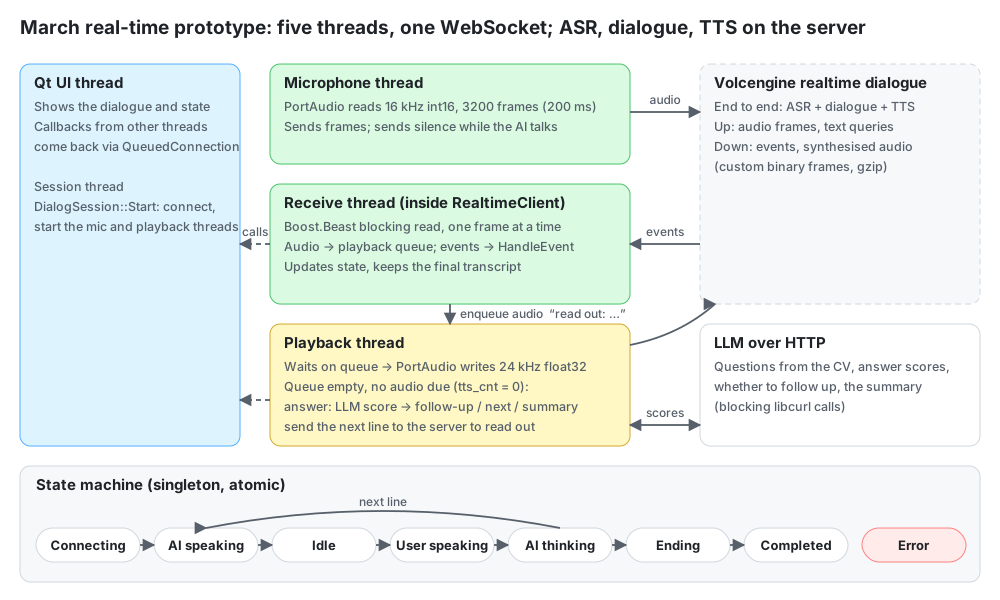
The code under src/interview/ is the first native real-time pipeline, written in March. Recognition, dialogue and synthesis all happen in Volcengine’s real-time dialogue service; the client moves audio and keeps state. Its Qt Widgets UI is no longer used, but the code still builds and runs.
The diagram shows it as it was in March. Its connection layer, RealtimeClient, has since been changed as in 5.4 so that one I/O thread owns the connection, and it is shared with the new engine; the receive thread in the diagram is now that I/O thread. The rest is unchanged. Five threads:
| Thread | Does |
|---|---|
| Qt UI thread | Shows the dialogue and state; only handles callbacks posted from other threads |
| Session thread | Runs DialogSession::Start: connect, open the session, start the microphone and playback threads |
| Microphone thread | Blocking PortAudio reads, sent as frames; sends silence while the interviewer talks. Reads were 3200 frames (200 ms at 16 kHz); the config now sets 320 (20 ms) |
| Receive thread | In March, blocking Boost.Beast reads inside RealtimeClient; audio into the playback queue, events to HandleEvent |
| Playback thread | Writes 24 kHz float32 audio from the queue to PortAudio; when the queue is empty and the in-flight count tts_cnt is zero, handles the candidate’s answer |
One turn:
- The interviewer talks: audio packets enter the queue and the playback thread plays them.
- The queue drains, the state becomes Idle and the microphone starts sending real audio.
- The server’s final recognition result goes into
pending_answerand the state becomes Interviewer thinking. - The playback thread asks the LLM to score the answer and decides whether the next line is a follow-up, the next question or the summary, then sends it with
CHAT_TEXT_QUERY, prefixed with “read the following text out directly:”, so the dialogue service reads it out. - Back to step 1.
The IELTS command-line version (src/ielts/) reuses RealtimeClient and the audio classes but only the recognition half: it opens the microphone for each answer, its callback takes only recognition results, and the examiner audio the server sends back is dropped.
2.7 native_voice: a new device layer
native_voice/ is an independent C++17 project written on 5 October that uses none of the prototype’s code. It has:
- audio pushed in by device callbacks that take no locks, allocate nothing and never block;
- preallocated single-producer single-consumer rings;
- its own worker thread;
- an epoch counter that invalidates queued audio;
- Qt Multimedia and PortAudio adapters, 48 kHz float by default.
Its worker currently does one thing: copy microphone data straight to playback. Network, recognition and synthesis are not written, and its tests and benchmark use synthetic data. Real-time voice did not end up going this way (see 5.5), so no product build uses it.
3. What the data looks like and where it lives
3.1 Backend
| Data | Where | Shape |
|---|---|---|
| Speaking practice | SpeakingAttempt → SpeakingTurn → SpeakingReport | part, questions, recording path, raw and cleaned transcript, transcript source, follow-up provenance, scores and feedback |
| Interviews | sessions, turns and reports in apps/interview | question source (bank, CV and JD), typed or voice, follow-ups, report |
| AI tasks | AITask | status, attempts (at most 3), request and result, fallback reason, usage; a unique idempotency key |
| Money | wallet, holds, ledger | balance checked first; charged by actual usage on success; not charged on failure or fallback |
| Question bank | JSON under data/ielts/ | speaking by test season, writing by source |
| Recordings, synthesised audio | files | tables store only the path; examiner audio cached per sentence |
3.2 Protocol frames to Volcengine
One WebSocket to Volcengine carries a custom binary framing:
| Part | Length | Content |
|---|---|---|
| Header | 4 bytes | Version, header size, message type, flags, serialisation and compression at 4 bits each; the last byte reserved |
| Event | 4 bytes, big-endian | 100 start session, 200 audio, 300 hello text, 500 given-text synthesis, 501 text query, 350/352/359 TTS start / audio / end, 450/451/459 user started speaking / ASR result / stopped |
| Session ID | 4-byte length + bytes | omitted for the connection events |
| Payload | 4-byte length + bytes | JSON or raw audio, optionally gzip |
On the C++ side there is a single implementation (src/common/protocol.cpp), shared by the prototype and the new engine. The backend’s volcengine_asr.py implements the same framing again in Python, and even reads the prototype’s config file.
4. Why it is split this way
The desktop shell wraps the web app instead of rewriting the UI. One set of pages serves both browser and desktop, so the UI changes in one place. The shell does only what a web page cannot, and real-time voice is one of those things.
Processes are split by whether the user is waiting. The user waits for the follow-up, so it streams inside the request over SSE; section scoring is slow, can fail and is billed, so it goes to the task table and the worker. If the worker dies, follow-ups still work.
Every model call goes through one entry point. All go through AIProvider, with a fallback chain: an OpenAI-compatible HTTP API → the local Codex CLI → a rule-based fallback, and every result records which path produced it.
Audio stays in C++; only control and text cross the bridge. Recording, playback and networking all happen in the C++ engine. studioVoice has only the commands to open a session, read, start listening, stop listening and end, plus three kinds of signal: state, transcript and error. Neither PCM nor credentials pass through the page.
The voice layer holds no question content. VoiceSession only reads one thing and listens to one thing; questions, follow-ups and scoring live in Django. So interviews and IELTS do not each need their own turn-taking logic. The prototype’s DialogSession, which mixes the two (5.3), is the counter-example.
The prototype’s trade-offs. One thread per blocking thing; half duplex while the interviewer talks, to keep echo out; the end-to-end dialogue model as a reader, so one connection gives both recognition and synthesis. The cost of each is in the next section.
5. Current problems
5.1 Real-time voice covers only part of the product
- Only the interview’s pressure mode is a real-time conversation. On the IELTS parts the examiner’s voice is still TTS from the backend played by the page, and answers are still recorded and uploaded; there the engine only captions.
- Still half duplex. The microphone is not uploaded while the AI talks, so there are no interruptions.
- The desktop shell has build instructions for macOS only (vcpkg’s
arm64-osx). - In an ordinary browser the transcript has to wait for the upload and backend recognition, one step slower than in the desktop app.
5.2 The same thing done several times
- Three C++ voice stacks. The new engine is the one in the product. The prototype shares
RealtimeClientwith it but keeps its old threading model, with the problems in 5.3.native_voice’s device layer is unused. - Volcengine’s protocol is implemented twice: once as C++
Protocol, once in the backend’s Pythonvolcengine_asr.py. - The IELTS command line reuses half: the classes, not the threading model or state machine, and the examiner audio is dropped.
5.3 Problems in the old real-time prototype
Correctness problems, all fixable locally without changing the structure. The first three rows are in the connection layer and were fixed by the change in 5.4, since the prototype and the new engine share one RealtimeClient; the rest are still in the prototype’s own code.
| Problem | Where | Consequence |
|---|---|---|
| TLS certificates not verified (fixed) | realtime_client.cpp sets ssl::verify_none | a man in the middle can impersonate the server |
| Several threads write the same WebSocket (fixed) | the microphone thread sends audio and the playback thread sends text queries, both straight to ws_->write, unlocked | frames can interleave and break the connection |
| Marked connected before the session is confirmed (fixed) | connected_ = true right after the handshake | data is sent before the session has started |
| Unbounded playback queue | std::queue<std::vector<float>> | a burst from the server grows memory and latency together |
The detached thread at the end captures this | the wrap-up thread detached in ProcessPendingAnswer, which also reads the queue without the lock | freed memory if the session is destroyed first, plus a data race |
| State callback invoked while holding the lock | InterviewStateMachine calls the callback under its mutex | a callback that changes state or unregisters itself deadlocks |
A full Stop() in the signal handler | the command-line entry’s signal handler | allocation, locks and join in a signal handler are unsafe |
Structural problems, which need architecture changes:
| Problem | How it is written | Consequence |
|---|---|---|
| 200 ms output blocks | input blocks are now 320 frames (20 ms); output is still 4800-frame blocks (200 ms at 24 kHz), blocking writes, plus a 10 ms sleep in the loop | buffering alone sets a 200 ms floor on the way down |
| LLM calls on the playback thread | with the queue empty, the playback thread makes blocking scoring and summary calls (libcurl) lasting seconds | audio waits in the queue meanwhile; Stop waits for the request; a result for a turn that is already void still gets read out |
| Turn-taking mixed with interview content | DialogSession holds the threads, queue and state machine together with the introduction, scoring, follow-ups and summary | to reuse it, IELTS would have to copy the whole class |
| Global singleton state machine | InterviewStateMachine::Instance() | an old and a new session overwrite each other’s state; tests cannot run in parallel |
| Half duplex | while the interviewer talks the microphone sends silence and “user started speaking” is ignored | no interruptions, early speech is lost, and the queue-clearing branch never runs |
| Dialogue model as a reader | relies on the prompt “read the following text out directly…” | the client cannot tell whether it read verbatim or added something. The new engine uses the given-text interfaces instead (2.5) |
The new engine was written as a separate layer (2.5) rather than by changing the prototype, so all of the above is still in the prototype.
5.4 The connection layer: four threads share one connection
This section expands the “several threads write the same WebSocket” row of 5.3, and the shutdown problem, then gives the fix. What follows describes the code before the change.
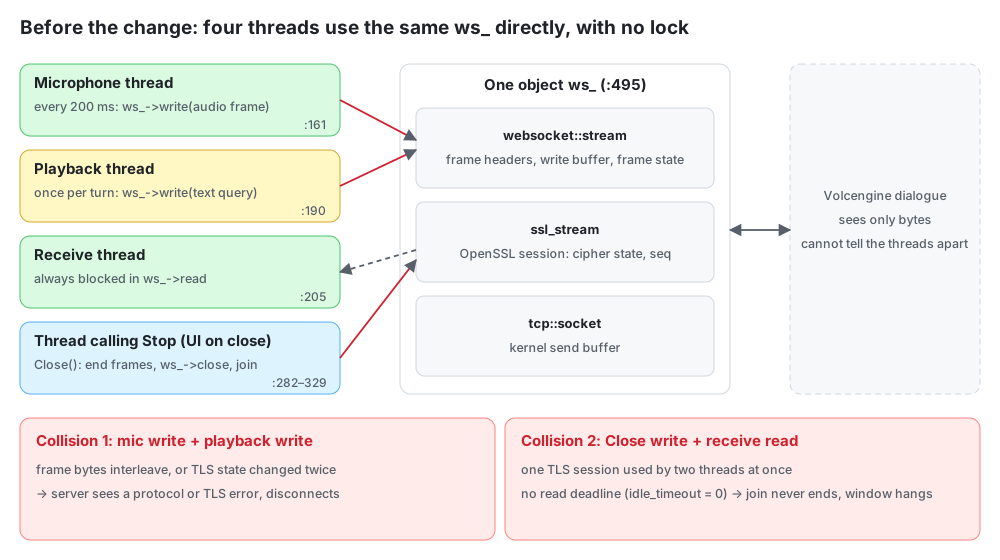
The whole connection is one object, ws_ at realtime_client.cpp:495, of type websocket::stream<ssl_stream<tcp::socket>>: WebSocket framing outside, TLS in the middle, TCP inside. The write buffer, frame state and the OpenSSL session’s cipher state and record sequence numbers all live in this one object. Boost.Beast and Asio say: one object may be used by only one thread at a time. Four threads used it directly, and nothing in RealtimeClientImpl locked ws_.
Collision 1: two threads write at once. When the playback thread sends the next line (SendNextPrompt → SendTextQuery), the microphone thread is still sending a silent frame every 200 ms. If the two writes overlap, the bytes can interleave like this:
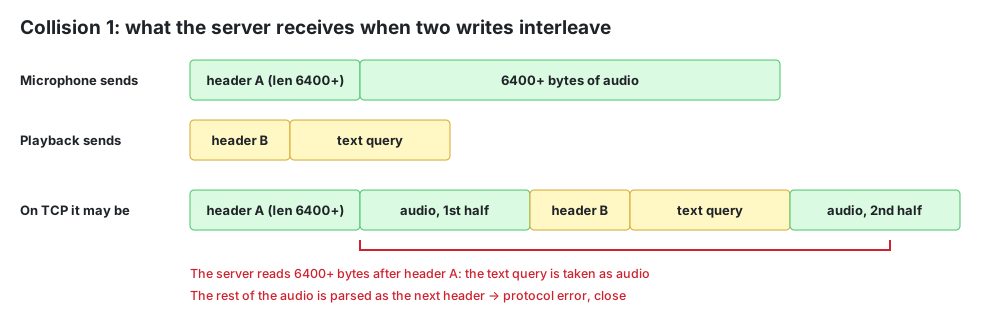
The server sees only bytes and cannot tell which thread sent which. Reading on after header A gives garbage, so it closes with a protocol error, or with a TLS error if the TLS state was changed twice. Volcengine allows audio and text frames in any order, as long as each frame is sent whole before the next; the client has to guarantee that. Each write takes a few milliseconds, so collisions are rare, which is exactly why it shows up as “occasional unexplained disconnects that will not reproduce”.
Collision 2: on shutdown, one thread writes while another reads. When the window closes, the UI thread calls Stop() from ~MainWindow, which joins the microphone and playback threads and then calls Close(): end-session frame, end-connection frame, ws_->close, then join the receive thread. But the receive thread is still blocked in ws_->read. Three consequences:
- The end frames can be corrupted, because one TLS session is in use by two threads.
- The window can hang. Reads have no deadline (
idle_timeout = 0, pings off), so if the server does not answer, the receive thread waits forever,joinnever returns, and the UI thread is stuck in the destructor. - The end-connection frame is sometimes skipped. When the server answers
SESSION_FINISHED, the receive thread setsconnected_tofalse, andClose()checksconnected_before sending that frame: the two threads race.
One more: the microphone thread writes to the network itself. When the network stalls and the TCP send buffer fills, it blocks in write, nobody reads PortAudio, the device’s input buffer overflows and part of the candidate’s speech is lost.
There are two ways to fix it.
One stops the bleeding with a few dozen lines:
- route all six
ws_->writecalls through one lock; - turn on a 10-second idle timeout and keep-alive pings, so shutdown hangs at most about ten seconds;
- after the end-session frame, have
Close()wait at most 2 seconds for the confirmation, then send end-connection, with no race onconnected_.
That stops write-write collisions, but read-write collisions remain and the microphone can still be blocked by the network.
The other is the real fix: one I/O thread owns the connection, with the public interface unchanged. This is the one that was done.
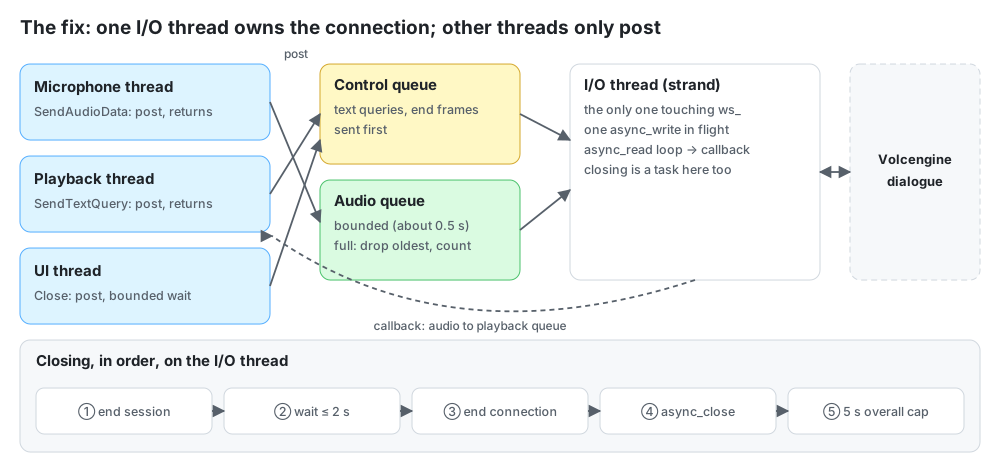
- Only the I/O thread touches
ws_. Reads, writes and close all run on one I/O thread: it is the only thread running the connection’sio_context, so all callbacks run one after another with no locks. Other threads callingSendAudioData,SendTextQuery,SendEventorCloseonly post a message and return at once, so the microphone thread can no longer be blocked by the network. - Two send queues. Control frames (text queries, given text, end frames) go first and are never dropped. The audio queue is bounded: past roughly 0.5 seconds of backlog it drops the oldest frame and counts it, so latency cannot keep growing.
- One
async_writein flight at a time. Theasync_readloop hands each message to the callback, which only enqueues. - Closing is a task posted to the I/O thread, run in a fixed order with an overall time limit. The pending read is cancelled cleanly instead of relying on a
running_flag. - Two fixes along the way: “connected” means the session-started event has arrived, and TLS verifies certificates.
Tests use a fake WebSocket server, under TSan:
- two threads sending flat out, and every frame the server receives is whole;
- a silent server, and
Close()returns within its limit; - a server that stops reading, and
SendAudioDatanever blocks while the drop count rises; - connect, send and close on the same object 20 times in a row without a crash.
This went first because the connection is the bottom layer: if it drops at random, turn-taking bugs above it cannot be told apart from transport bugs. It also keeps the interface, so the layers above need no changes.
Results.
- Done on 30 October: the four tests above, plus certificate checking, the order of the end frames, the server ending the session first, and cleanup when the connection fails, 10 in all; release, ASan+UBSan and TSan builds all pass on Linux (gcc). Checking against Volcengine’s API document turned up
dialog.extra.model, marked required in StartSession and never sent by the old code; it is sent now. - Finding the certificates: with verification on, the Mac could not find root certificates. The OpenSSL vcpkg builds looks in its own install prefix, which has no bundle, and macOS keeps its roots in the keychain, which OpenSSL cannot read. So with an empty
ca_filethe client now triesSSL_CERT_FILE, OpenSSL’s default file and macOS’s own/etc/ssl/cert.pemand a few others in turn; if none exists it fails with an error, and verification is never quietly turned off. - 20 ms chunks: with the microphone thread no longer blocked by the network, the microphone read could go from 200 ms to 20 ms. Measured on the Mac, reading 320 frames at a time for 5 seconds per device, with no overflow:
- Bluetooth headset: median 18.8 ms, p90 24.3 ms, max 71 ms;
- built-in microphone: median 18.7 ms, p90 24.0 ms, max 29 ms.
- After that: the engine in 2.5 was written on top of
RealtimeClient, wired into the desktop shell on 31 October and run against the real service.
5.5 native_voice is at its first step
The plan splits this line into six slices: 2A interfaces and baseline, 2B callback adapters and measurement, 2C connecting to the server, 2D continuous recording and interruption, 2E wiring into the desktop shell, 2F echo cancellation and long runs. Only the 2B code exists, with no measurement on real devices.
Connecting to the server and wiring into the desktop shell were later done with a new VoiceSession on the fixed RealtimeClient, not along this line. What native_voice still offers is its callback device layer: if measurement shows blocking I/O jitters too much, it can replace the PortAudio implementation of AudioDevice.
5.6 Web and backend
- The PCM WebSocket relay (off by default) calls
accept()immediately without checking for a logged-in user, and the queue to Volcengine,queue.Queue(), is unbounded. - The scoring page: both front-end polling deadlines are infinite, while the back-end “stuck” check lives only in the history list and report detail, not in the task endpoint. So when the worker is down, the waiting page spins forever.
- Front-end files are too big:
app.jsis almost 18,000 lines andstyles.css47,000.
6. Where to start reading
desktop/src/:studio_page.cpp,studio_profile.cpp(where dictation is hidden),native_bridge.cpp.backend_django/config/urls.py, thenstart_attempt,complete_turn,stream_follow_up_sse_eventsandscore_attemptinapps/speaking/services.py.backend_django/apps/ai/: the task table inmodels.py, the worker loop inworker.py, the fallback chain inprovider_adapters.py.backend_django/apps/interview/engine.py: interview sessions and turns.Real-time voice, bottom up:
include/services/realtime_client.handsrc/services/realtime_client.cpp(the connection layer);include/voice/voice_session.h(the threading and state rules are in its comments), thensrc/voice/voice_session.cpp;desktop/src/voice_bridge.handrealtime_voice_engine.cpp;web/static/interview-voice.js.
The tests are
tests/realtime_client_test.cppandtests/voice_session_test.cpp, sharingtests/fake_realtime_server.h.The prototype:
src/interview/dialog_session.cpp(HandleEvent,MicrophoneThreadFunc,PlaybackThreadFunc,ProcessPendingAnswer) andsrc/common/protocol.cpp, read alongsidetests/protocol_test.cpp.native_voice/: the contract inREADME.mdfirst, thensrc/engine.cpp.