
Picture the 100 µs when the market is moving hard. Your strategy thread gets preempted once, or another task wipes its L1/L2 once, and that single event costs 30 µs. Your order now enters the exchange’s matching queue behind everyone else’s, and the fill comes back one tick worse — adverse selection eating your edge. In a latency-sensitive trading system the enemy is not the average latency but the tail and the jitter: a 2 µs average that occasionally spikes to 50 µs is worse than a steady 5 µs.
So everything in this post serves one goal: make your hot thread the only thing that will ever run on its physical core, and keep it that way. Part 1 clears everyone else off the core — pinning and the isolation stack. Part 2 deals with the core tripping you up by itself — SMT, C-states and frequency. Part 3 turns to memory, because on a multi-socket server not all memory is equally close.
1. Pinning and Isolation: Clear the Core
1.1 Why Threads Wander, and What It Costs
The Linux scheduler (CFS; EEVDF since 6.6) migrates threads between cores for load balancing by default. It sees core 3 is idle and core 8 has two runnable tasks, so it moves one over to core 3. From a “use all cores fairly” standpoint that’s correct. For your hot thread, that one migration is a catastrophe.
Why a catastrophe: L1, L2, and the TLB are all private to each physical core. Your thread has been running on core 7 for a while — the order book’s hot data, the strategy code’s instructions, the address-translation entries — all of it lives in core 7’s caches. The scheduler moves it to core 12, whose L1/L2 hold none of that. So for the next tens of thousands of instructions, every memory access is a miss: pull from L3 (~40 cycles) or pull from main memory (~200–300 cycles). Measured, one migration buys you a degradation window of tens of microseconds during which the thread is just re-warming caches and doing real work at a fraction of its normal rate. If the migration also crossed a socket, it’s worse still — the data is now “remote memory,” and every access pays roughly 50% more, permanently (Part 3).
Pinning (affinity) tells the scheduler: this thread runs on this core and nowhere else. It drives the migration cost straight to zero.
But note carefully: pinning only solves “the thread gets moved away.” It does nothing about “there’s someone else on the core.” You nail your thread to core 3, and core 3’s periodic timer tick, its softirqs, its kernel threads, and any other userspace process are all still there, still preempting you on schedule. Pinning is necessary but not sufficient; it needs a whole isolation stack behind it.
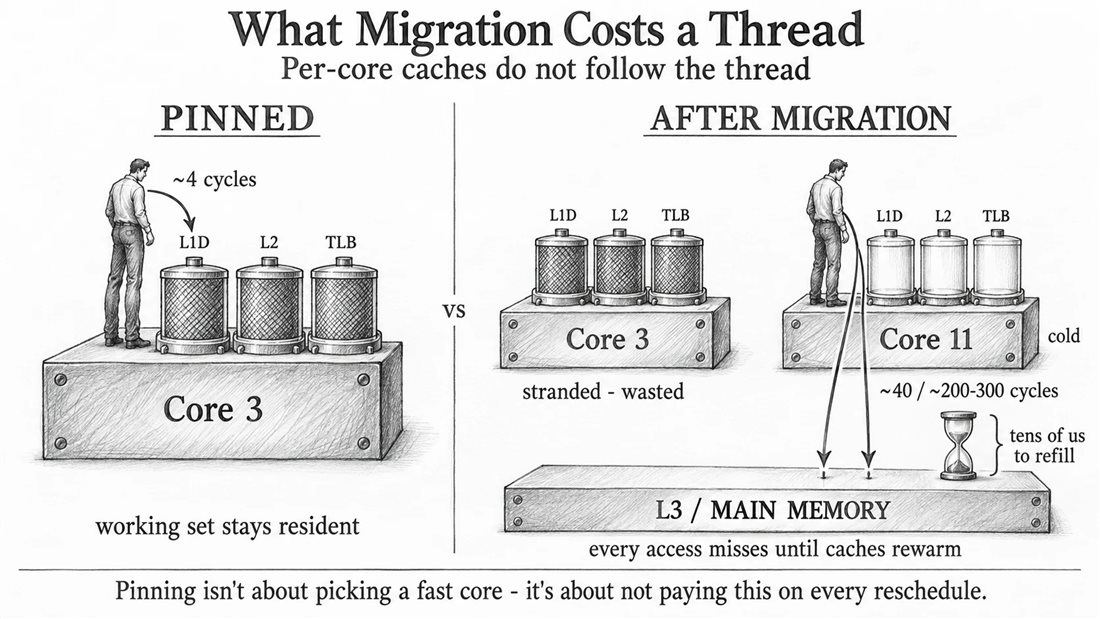
1.2 The Isolation Stack: Evicting the Noise One Layer at a Time
Picture core 3 on a bare, unconfigured machine, and count how many times per second it gets interrupted: your hot thread wants to run, other userspace threads may get scheduled onto it, kernel threads (kworker, ksoftirqd) have work to do, the 1000 Hz periodic timer tick fires no matter what, every packet the NIC receives is a hardware interrupt, that hardirq raises a softirq, and RCU callbacks need a core to run on.
Isolation means shutting these noise sources off one layer at a time. Each layer maps to one specific source of noise:
isolcpus=3 (kernel boot parameter) — removes core 3 from the scheduler’s general-purpose pool. The scheduler will no longer place tasks there on its own, and woken tasks won’t land there by default. Historically it also pulls the core out of the scheduling domains, so it doesn’t participate in load balancing.
There’s a misconception almost everyone hits here: isolcpus is not a permission wall. It does not stop you from explicitly pinning a thread onto the core. It only makes the automatic, default scheduling behavior route around it. The standard usage is exactly this: use isolcpus to clear cores 3–7 (nothing arrives automatically), then have your program use the affinity API to place hot threads onto them one by one, by name — one thread per core, exclusively. So: after isolcpus=2-7, can taskset -c 4 ./app still run on core 4? Yes — and that is precisely how it’s meant to be used.
nohz_full=3 (kernel boot parameter) — turns off the periodic timer tick. Normally the kernel hits each core with a timer interrupt 100 to 1000 times a second for timeslice accounting and bookkeeping. nohz_full lets the core stop that tick when there is exactly one runnable task on it.
Emphasis on exactly one. The moment you put a second runnable thread on that core, the kernel can’t account for two threads with a single tick, and the tick comes right back. So nohz_full is welded to “one thread owns one core.”
rcu_nocbs=3 (kernel boot parameter) — RCU is a synchronization mechanism used heavily throughout the kernel, and its reclaim phase has callbacks that must run on some core. rcu_nocbs hands core 3’s callbacks off to dedicated rcuop/N threads on other cores. nohz_full automatically adds the cores it covers to rcu_nocbs, which is why the two usually appear together.
irqaffinity=0,1 (kernel boot parameter) + /proc/irq/N/smp_affinity — which cores device interrupts are delivered to by default. Set the default mask to cores 0 and 1 only, then pin specific IRQs finely, and a NIC packet raises an interrupt on a housekeeping core, not your hot core. (Interrupt affinity deserves its own post.)
And then there’s a class of things you can’t turn off — you can only starve them. Per-CPU kernel threads with a core number in their name — ksoftirqd/3, kworker/3, migration/3 — are intrinsic to every core; isolcpus can’t delete them. But they only wake when there’s work: ksoftirqd/3 handles softirqs on core 3, and once you’ve steered NIC interrupts away, core 3 stops generating network softirqs, so it stays asleep. kworker/3 handles work items dispatched to core 3, and once you’ve moved RCU callbacks and interrupts off, the work dispatched to it trends to zero, so it doesn’t wake either. The idea isn’t “kill the thread” — it’s “cut off its supply of work so it sleeps forever.”
Every non-isolated core (usually core 0, sometimes plus core 1) is called a housekeeping core in this layout. You haven’t eliminated the system’s noise — you’ve herded all of it onto the housekeeping cores in exchange for absolute quiet on the hot core.
Finally, there’s an irreducible residue. Even with all of the above configured, a nohz_full core still gets a residual timer interrupt at roughly 1 Hz; when another process changes its address space (munmap/mprotect) and shares an address space with you, you get a TLB-shootdown inter-processor interrupt (IPI); there are occasional scheduling IPIs; there’s the NMI watchdog (turn it off with nmi_watchdog=0); and there’s SMI — a firmware-level System Management Interrupt the OS cannot see at all, tens to hundreds of microseconds each, addressable only in the BIOS. The magnitude and frequency of this residue is the “floor” you measure with cyclictest / oslat.
1.3 Four Mechanisms, and What “Isolation Strength” Really Means
isolcpus is kernel-level, a boot parameter, with strong isolation (it genuinely removes the core from the scheduling pool). The cost is that it’s static — changing it means a reboot.
cpuset (a cgroup subsystem) is also kernel-level and also strong isolation, but dynamic: at runtime you can carve out a pool of CPUs plus memory nodes and move processes in or out. It has one capability isolcpus lacks — it can carve out memory nodes too, which is useful in NUMA setups. Kernel docs now recommend cpuset + nohz_full over isolcpus, but isolcpus is still heavily used in production because it’s simple, reliable, and takes effect at boot.
taskset (process-level command) and pthread_setaffinity_np / sched_setaffinity (thread-level APIs) provide weak isolation, where “weak” precisely means: they only constrain “this process/thread may run only on these cores” — they do not stop other threads from running on those cores too. Real isolation must come from isolcpus or cpuset clearing the core first.
sched_setaffinity vs pthread_setaffinity_np: the former is the raw syscall, identifying the thread by TID (pass 0 for “myself”); the latter is a glibc wrapper that calls the former internally, identifying the thread by pthread_t handle. The _np suffix is “non-portable” (a glibc extension, not POSIX).
1.4 Four Pitfalls in a “Pin and Spawn” Helper
A common “pin a core and start a thread” wrapper, trimmed down:
inline auto setThreadCore(int core_id) noexcept {
    cpu_set_t cpuset;
    CPU_ZERO(&cpuset);
    CPU_SET(core_id, &cpuset);
    return (pthread_setaffinity_np(pthread_self(), sizeof(cpu_set_t), &cpuset) == 0);
}

template<typename T, typename... A>
inline auto createAndStartThread(int core_id, const std::string &name, T &&func, A &&... args) noexcept {
    auto t = new std::thread([&]() {
        if (core_id >= 0 && !setThreadCore(core_id)) { /* print error; exit(EXIT_FAILURE) */ }
        std::forward<T>(func)((std::forward<A>(args))...);
    });
    std::this_thread::sleep_for(1s);   // bet that "affinity has taken effect + thread has migrated"
    return t;
}
setThreadCore is fine: cpu_set_t is a bitmask, CPU_ZERO/CPU_SET are the macros to manipulate it, calling it on pthread_self() means “nail myself to core_id,” and noexcept + a bool return is hot-path style. The problems are in the outer layer:
Pitfall 1 — dangling references. The lambda captures core_id, name, and args... by reference ([&]), and it may not start executing until after createAndStartThread has returned. By then the stack frame is gone and every reference dangles. The fix is capture by value, or pack the arguments into a std::tuple and unpack with std::apply.
Pitfall 2 — sleep_for(1s) papers over a race. The race it papers over: when the main thread does return t, the child’s func may already be running but setThreadCore hasn’t taken effect yet. The right fix is a handshake: std::latch ready{1}, the child calls count_down after setting affinity, the main thread waits before returning. Incidentally, sleeping a full second also needlessly slows startup.
Pitfall 3 — a raw new std::thread that is never deleted. And it returns a joinable thread pointer with no convention for who calls join/detach; a std::thread that’s still joinable at destruction calls std::terminate outright.
Pitfall 4 — the first migration still happens. The thread is born and starts running on the creator’s core, then migrates to the target core at its entry point. You still pay for that first migration’s cold cache. The thorough fix is pthread_attr_setaffinity_np, so the thread is born on the target core in the first place.
1.5 A Layout Rule: Stay Off Core 0
Core 0 is Linux’s boot CPU and a natural sink for housekeeping activity: RCU’s grace-period kernel threads, the default workqueue, some IRQs that can’t be migrated, the NMI watchdog, timekeeping, kworker. Even with every other core isolcpus’d, this stays concentrated on core 0 (overflowing to core 1 sometimes). So the standard layout is: housekeeping activity confined to cores 0 (and 1), hot threads elsewhere; on a dual-socket box the hot core also goes on the NUMA node the NIC is attached to. Use lscpu -e=CPU,CORE,SOCKET to see the mapping clearly before you pick cores.
2. SMT and Frequency: The Core Trips You Up By Itself
Part 1 was about evicting other people from your core. This one is different: the core itself has a few features that will make your latency jitter even when you own the whole thing.
2.1 Hyper-Threading: One Physical Core Pretending to Be Two
Hyper-Threading (Intel’s name; SMT generically) makes one physical core present as two logical cores. The OS sees CPU 0 and CPU 48, but they’re two register-state sets on the same physical core. When one pipeline stalls waiting on memory, the core can switch to executing the other state’s instructions to fill the stall — good for throughput, typically 15%–30% more.
But those two logical cores share almost everything that actually matters: the execution units (ALU, FPU), L1, L2, the store buffer, the TLB, the branch predictor. So: you pin your hot thread to CPU 0, believing you own a core; then another task gets scheduled on CPU 48, it runs AVX and holds the FP unit while you wait for it, and its memory accesses evict the L1 you both share so your hot data has to reload. The premise of “I own this core” is broken by the sibling.
Check whether it’s on and which two are siblings:
lscpu -e                                                          # look at the CORE column; same number = siblings
cat /sys/devices/system/cpu/cpu0/topology/thread_siblings_list    # lists CPU0's siblings directly
cat /sys/devices/system/cpu/smt/active                            # 1 = SMT is on
How to turn it off: most thorough is disabling HT globally in the BIOS, or nosmt on the kernel command line. If you don’t want it off globally, take siblings offline one at a time:
echo 0 > /sys/devices/system/cpu/cpu48/online # CPU48 disappears, CPU0 owns the whole physical core
Verify by running cyclictest before and after and comparing the max and the number of spikes.
2.2 C-States: The Core Dozes, and Waking It Takes Time
C-states are the CPU’s idle power-saving states. C0 is working; C1 / C1E are light halt; C3 and C6 are deep sleep — the deeper the state, the more power saved, but the longer it takes to wake up. C6 flushes L1 and L2 and drops the core voltage; coming back from C6 to C0 takes roughly 30 to 100 microseconds.
If your thread’s rhythm is “process a market-data packet, then briefly idle,” the core may slip into C6 during that idle; when the next packet arrives, the first 30–100 µs go entirely to waking the core. This is an insidious tail-latency source because it only fires right after an idle period.
Three fixes, coarse to fine:
idle=poll(kernel boot parameter) — the bluntest: the core enters no C-state when idle, it spin-polls. Lowest latency, but power and heat go to maximum.- Cap the deepest C-state —
processor.max_cstate=1+intel_idle.max_cstate=1, or at runtimeecho 1 > /sys/devices/system/cpu/cpuN/cpuidle/stateX/disableper state. Allow light sleep, forbid deep sleep. /dev/cpu_dma_latency(PM QoS) — open this device file, write a 32-bit integer0into it, and keep the file descriptor open. This tells the kernel “the whole system’s tolerable wakeup latency is 0 µs,” and the kernel keeps cores out of deep C-states accordingly. Close the fd and the constraint lifts. This is the in-program option, more flexible than a boot parameter.
2.3 P-States: The Core Changes Speed, So Weld It Shut
P-states govern frequency and voltage. Two things are moving:
One is the governor. The default powersave governor ramps frequency up gradually with load — when your thread suddenly gets busy, it doesn’t jump to full speed, it “sees load rising, steps up one notch, checks again, steps up again,” and your first few packets run at low frequency during that climb. Switch to the performance governor and it welds to the highest non-turbo frequency.
The other is Turbo (opportunistic frequency). “Run above the rated frequency if there’s thermal and power headroom.” The problem is it makes frequency a variable: it depends on how many cores are busy, how hot the chassis is, and whether your instruction stream contains AVX-512 (heavy AVX triggers a frequency-license downclock). When frequency changes, every piece of code’s execution time changes with it — that’s jitter. The HFT approach is usually to disable Turbo and run the core at a fixed base frequency — sacrifice peak speed for identical execution time every time.
cpupower frequency-set -g performance
cpupower frequency-set -d 3.5GHz -u 3.5GHz               # floor = ceiling, frequency nailed
echo 1 > /sys/devices/system/cpu/intel_pstate/no_turbo   # disable turbo
SMT, C-states, and P-states have one thing in common: they’re all designed for average efficiency / power saving / peak throughput, and those goals conflict with “identical execution time every time.” The hot core gets the same treatment across the board — frozen at full power: sibling disabled, deep sleep forbidden, frequency locked. You deliberately give up part of the core’s capability and all of its elasticity in exchange for it being absolutely predictable.
3. NUMA: Memory Isn’t Uniform
The first two parts cleaned up the CPU side. This one changes dimension: memory. On a multi-socket server, how long “access memory” takes depends on which memory you’re accessing.
3.1 Two Sockets, One UPI Link
A dual-socket server is physically two CPUs, each wired directly to some of the DIMMs. CPU 0 accessing memory “attached to itself” is a local access, about 90 ns. CPU 0 accessing memory “attached to CPU 1” has to send the request across the inter-CPU interconnect (Intel calls it UPI, AMD Infinity Fabric) to CPU 1, have CPU 1’s memory controller fetch it, and route the result back — a remote access, about 140 ns.
numactl --hardware shows you this; it prints a node distances matrix where local is 10 and remote is 21, and the ratio 2.1 approximates the latency multiplier.
The key point: this surcharge is not an occasional spike — it’s a tax you pay on every single remote access. If your hot thread runs on CPU 0 and its order-book data was accidentally allocated on node 1, then every time it touches that order book, for its entire lifetime, it’s 50 ns slower. That’s not jitter — it’s a baseline shift of the whole distribution, a completely different shape from the discrete, “only fires right after idle” spikes of C-state wakeups.
Figure: housekeeping cores (0/1) absorb device interrupts and kernel chores; Core 3 is cleared by three boot parameters, then the hot thread is pinned onto it; reaching node 1 memory crosses the UPI link, about +50 ns per access.
3.2 First-Touch: The Page Follows the First Writer, Not malloc
This is the most counterintuitive thing in NUMA, and the easiest to get wrong.
When you malloc(1GB), Linux does not actually give you 1 GB of physical memory — it just reserves a range of virtual addresses in your address space. The physical page is allocated the first time you write to that page (a page fault triggers it). And the kernel’s default policy for that allocation is first-touch: the physical page goes on the NUMA node of the core that performed the first write.
Consequence: if you malloc a big block in your main thread and memset it to zero for good measure, that entire block lands on whatever node the main thread was on at the time. Then you pin a worker thread to a core on a different node to use it — and every access is remote. The correct pattern is whoever uses it initializes it: after allocating, don’t touch the memory; let the worker thread that will ultimately use it perform the first write, on its own core.
3.3 membind, preferred, interleave
numactl and libnuma offer three memory-binding policies, differing in “what happens when the node runs out”:
--membind=0(strict binding) — allocate only from node 0, and if node 0 is full, fail / OOM, even if node 1 has plenty of free memory. Worse, before it truly OOMs the kernel first runskswapdhard to reclaim node 0, and that reclaim is itself a burst of jitter. So with strict binding you have to watch the target node’s free memory yourself and grow capacity symmetrically — not loosen to--preferredat the first sign of trouble, which throws away the NUMA-locality guarantee.--preferred=0(soft preference) — prefer node 0, fall back to other nodes if it’s short. Won’t OOM, but you lose the “data is definitely local” guarantee.--interleave=all(interleaving) — pages are assigned round-robin across nodes. Not designed for latency — it’s for bandwidth: an analytical job that sweeps huge amounts of memory can spread the bandwidth pressure across all memory controllers. Not for the HFT hot path.
The libnuma APIs are numa_alloc_onnode(), numa_run_on_node(), numa_set_localalloc(); the underlying syscalls are mbind(2), set_mempolicy(2), move_pages(2). For diagnosis use numastat -p <pid> and watch how much each node allocated and whether numa_miss / numa_foreign are climbing.
3.4 The Best NUMA Fix Is Not Having the Problem
Everything above is remediation after the fact — data is already shared, already crossing threads. A genuinely low-latency system’s first choice is to make the NUMA problem not exist:
- Hot path is single-threaded + pinned, data is private — no sharing, no cross-node problem.
- When you need multiple worker threads, go share-nothing: each thread has its own copy of state, pinned to a core on its own node, using its own node’s memory, exchanging only what’s necessary between threads via message passing (lock-free queues).
- Then every thread is doing local accesses, and that
21in the NUMA distance matrix is something you never touch.